
We work with Yodlee—a market leader in financial data connectivity—to protect your financial information. We set up and manage the secure connections between your chosen institutions and Yodlee. The aggregation service is read-only, meaning that data can be read but no transactions or updates can occur at Morgan Stanley. Learn more about how we safeguard your information on our Online Security Center.

Put Your Money to Work With Our Financial Management Tools
Managing multiple financial accounts across different firms can be complicated. With Morgan Stanley Online, you can link your non-Morgan Stanley accounts and analyze your cash flow all in one place.

Follow These 3 Steps to Get Started
Log into Morgan Stanley Online to see where your dollars are going.
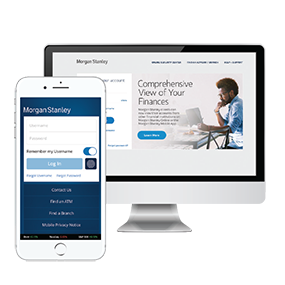
Step 1: Log In
Log into Morgan Stanley Online at morganstanley.com/online or the Morgan Stanley Mobile App.
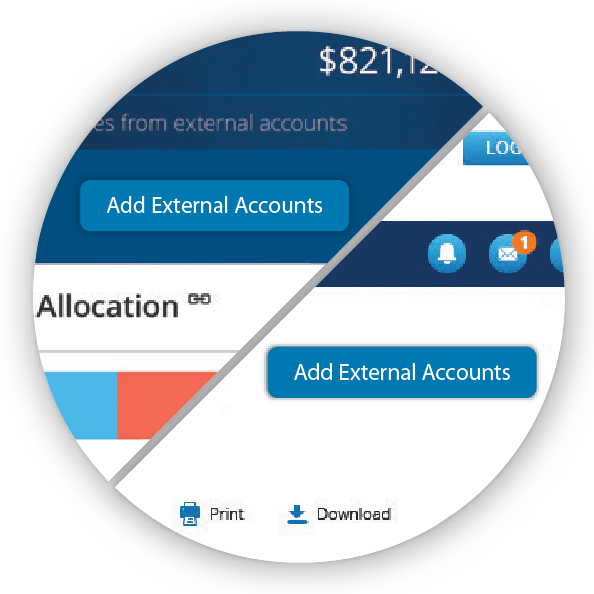
Step 2: Add External Accounts
Click on the “Add External Accounts” button.
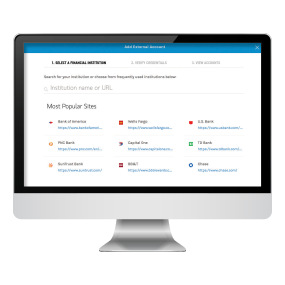
Step 3: Enter Your Credentials
Select the financial institution, enter your credentials and follow the guided prompts to complete the process.
Add your external 401(k), checking/savings, brokerage accounts, cryptocurrency accounts, and more to Morgan Stanley Online to see your finances all in one place.
View your incoming and outgoing cash, gain insights on your spending habits and create custom budgets no matter where your money is held.
Identify opportunities and risks across your entire portfolio with your Financial Advisor. This can help you to better achieve your financial goals.
Get a comprehensive view of your incoming and outgoing cash no matter where your money is held.
View your automatically categorized expenses, helping you and your Financial Advisor align your spending plan with your financial objectives.
Tools That Put You in Control
View your accounts online, move money with one tap, and track progress toward your goals.

Total Wealth View
Link your non-Morgan Stanley accounts and analyze your cash flow all on a single platform.

Spending and Budgeting
Access tools that help you understand your spending.

Morgan Stanley Online
Seamlessly and securely manage your investments and everyday finances in one place.

Morgan Stanley Digital Vault
Upload important documents online and share them with your Morgan Stanley team.
Download the Mobile App
Click a link below to download the Morgan Stanley Wealth Management app on your mobile device and use your Morgan Stanley Online username and password to log in.

Total Wealth View is an asset aggregation tool offered by Morgan Stanley and its unaffiliated service provider, Yodlee Inc. Asset aggregation utilizes technology that retrieves information about your external accounts, assets, and liabilities at or available through third party sites as authorized by you. This information is provided solely as a service to you from external sources which Morgan Stanley believes to be reliable but does not independently verify. As such, you should always consult the official statements provided by the applicable custodian for the most accurate and up-to-date information. Total Wealth View information is in no way intended to be, and should not be construed as, an offer or a solicitation of an offer or a recommendation to buy, sell, or hold any security, financial product, or instrument or to open a particular account or to engage in any specific investment strategy. Additional information about the service is in the applicable terms of use.
Information related to your external accounts is provided for informational purposes only. It is provided by third parties, including the financial institutions where your external accounts are held. Morgan Stanley does not verify that the information is accurate and makes no representation or warranty as to its accuracy, timeliness, or completeness. Additional information about the features and services offered through Total Wealth View are available on the Total Wealth View site on Morgan Stanley Online and also in the Total Wealth View Terms and Conditions of Use.
Information contained herein has been obtained from sources considered to be reliable. Morgan Stanley Smith Barney LLC ("Morgan Stanley") does not guarantee their accuracy or completeness. Information subject to change without notice. Yodlee is not affiliated with Morgan Stanley".
You have the option to provide your Financial Advisor with access to your Spending and Budgeting information upon enrollment. This election allows the Financial Advisor(s) to view all of your aggregated financial information on, including information about external accounts held at other financial institutions and all related transactions. You may update this election at any time. Financial Advisors may not provide advice on any external accounts.
The Morgan Stanley Mobile App is currently available for iPhone® and iPad ® from the App Store® and Android ™ on Google Play.™ Standard messaging and data rates from your provider may apply. Apple, ® the Apple logo, iPhone® iPad ® and iPad Air® are trademarks of Apple Inc., registered in the U.S. and other countries. Apple Pay™ and iPad mini™ are trademarks of Apple Inc. App Store is a service mark of Apple Inc. Android and Google Play are trademarks of Google Inc. Subject to device connectivity.
Buying, selling, and transacting in Bitcoin, Ethereum or other digital assets (“Digital Assets”), and related funds and products, is highly speculative and may result in a loss of the entire investment. Risks and considerations include but are not limited to:
• Digital Assets have only been in existence for a short period of time and historical trading prices for Digital Assets have been highly volatile. The price of Digital Assets could decline rapidly, and investors could lose their entire investment.
• Certain Digital Asset funds and products, allow investors to invest on a more frequent basis than investors may withdraw from the fund or product, and interests in such funds or products are generally not freely transferrable. This means that, particularly given the volatility of Digital Assets, an investor will have to bear any losses with respect to its investment for an extended period of time and will not be able to react to changes in the price of the Digital Asset once invested (for example, by seeking to withdraw) as quickly as when making the decision to invest. Such Digital Asset funds and products, are intended only for persons who are able to bear the economic risk of investment and who do not need liquidity with respect to their investments.
• Given the volatility in the price of Digital Assets, the net asset value of a fund or product that invests in such assets at the time an investor’s subscription for interests in the fund or product is accepted may be significantly below or above the net asset value of the product or fund at the time the investor submitted subscription materials.
• Certain Digital Assets are not intended to function as currencies but are intended to have other use cases. These other Digital Assets may be subject to some or all of the risks and considerations set forth herein, as well as additional risks applicable to such Digital Assets. Buyers, sellers and users of such Digital Assets should thoroughly familiarize themselves with such risks and considerations before transacting in such Digital Assets.
• The value of Digital Assets may be negatively impacted by future legal and regulatory developments, including but not limited to increased regulation of such Digital Assets. Any such developments may make such Digital Assets less valuable, impose additional burdens and expenses on a fund or product investing in such assets or impact the ability of such a fund or product to continue to operate, which may materially decrease the value of an investment therein.
• Due to the new and evolving nature of digital currencies and the absence of comprehensive guidance, many significant aspects of the tax treatment of Digital Assets are uncertain. Prospective investors should consult their own tax advisors concerning the tax consequences to them of the purchase, ownership and disposition of Digital Assets, directly or indirectly through a fund or product, under U.S. federal income tax law, as well as the tax law of any relevant state, local or other jurisdiction.
• Over the past several years, certain Digital Asset exchanges have experienced failures or interruptions in service due to fraud, security breaches, operational problems or business failure. Such events in the future could impact any fund’s or product’s ability to transact in Digital Assets if the fund or product relies on an impacted exchange and may also materially decrease the price of Digital Assets, thereby impacting the value of your investment, regardless of whether the fund or product relies on such an impacted exchange.
• Although any Digital Asset product and its service providers have in place significant safeguards against loss, theft, destruction and inaccessibility, there is nonetheless a risk that some or all of a product’s Digital Asset could be permanently lost, stolen, destroyed or inaccessible by virtue of, among other things, the loss or theft of the “private keys” necessary to access a product’s Digital Asset.
• Investors in funds or products investing or transacting in Digital Assets may not benefit to the same extent (or at all) from “airdrops” with respect to, or “forks” in, a Digital Asset’s blockchain, compared to investors who hold Digital Assets directly instead of through a fund or product. Additionally, a “fork” in the Digital Asset blockchain could materially decrease the price of such Digital Asset.
• Digital Assets are not legal tender, and are not backed by any government, corporation or other identified body, other than with respect to certain digital currencies that certain governments are or may be developing now or in the future. No law requires companies or individuals to accept digital currency as a form of payment (except, potentially, with respect to digital currencies developed by certain governments where such acceptance may be mandated). Instead, other than as described in the preceding sentences, Digital Asset products’ use is limited to businesses and individuals that are willing to accept them. If no one were to accept digital currencies, virtual currency products would very likely become worthless.
• Platforms that buy and sell Digital Assets can be hacked, and some have failed. In addition, like the platforms themselves, digital wallets can be hacked, and are subject to theft and fraud. As a result, like other investors have, you can lose some or all of your holdings of Digital Assets.
• Unlike US banks and credit unions that provide certain guarantees of safety to depositors, there are no such safeguards provided to Digital Assets held in digital wallets by their providers or by regulators.
• Due to the anonymity Digital Assets offer, they have known use in illegal activity, including drug dealing, money laundering, human trafficking, sanction evasion and other forms of illegal commerce. Abuses could impact legitimate consumers and speculators; for instance, law enforcement agencies could shut down or restrict the use of platforms and exchanges, limiting or shutting off entirely the ability to use or trade Digital Asset products.
• Digital Assets may not have an established track record of credibility and trust. Further, any performance data relating to Digital Asset products may not be verifiable as pricing models are not uniform.
Investors should be aware of the potentially increased risks of transacting in Digital Assets relating to the risks and considerations, including fraud, theft, and lack of legitimacy, and other aspects and qualities of Digital Assets, before transacting in such assets.
https://www.morganstanley.com/what-we-do/wealth-management/security-center to learn more about MS mobile security
Morgan Stanley Smith Barney LLC is a registered Broker/Dealer, Member SIPC, and not a bank. Where appropriate, Morgan Stanley Smith Barney LLC has entered into arrangements with banks and other third parties to assist in offering certain banking related products and services.
Investment, insurance and annuity products offered through Morgan Stanley Smith Barney LLC are: NOT FDIC INSURED | MAY LOSE VALUE | NOT BANK GUARANTEED | NOT A BANK DEPOSIT | NOT INSURED BY ANY FEDERAL GOVERNMENT AGENCY.
CRC #5366456 (04/2026)